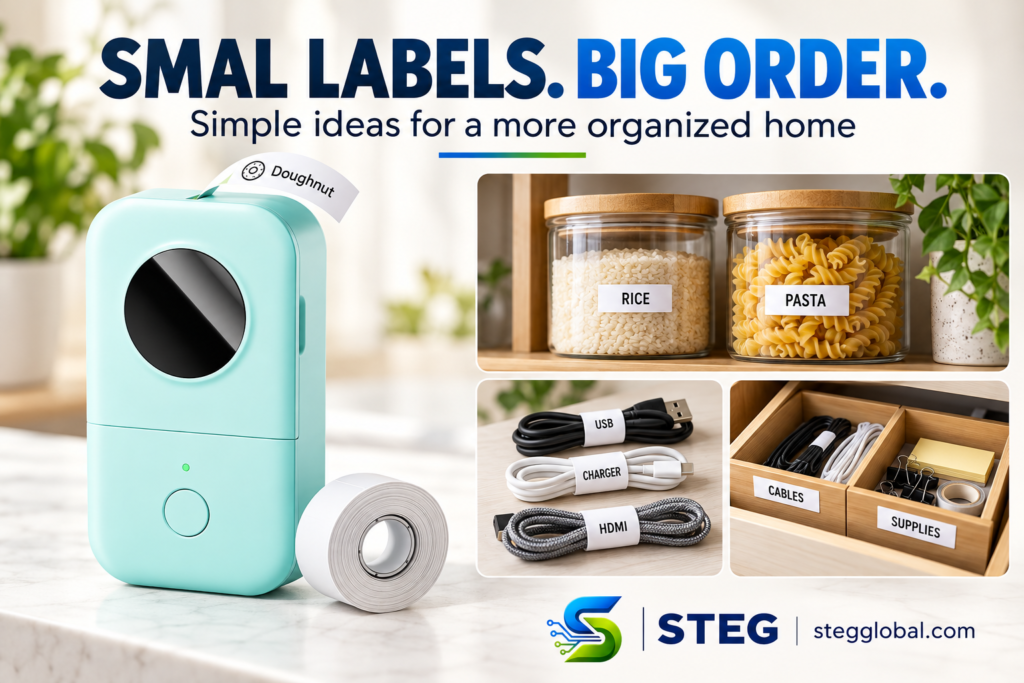
Loose cables, unmarked containers, and crowded drawers can make everyday items harder to find. A small label maker offers a simple way to give those items a clear name and a proper place.
The Phomemo D30 is a portable Bluetooth label printer that lets you create labels from your phone. Here are some useful ways to use it at home, along with a few things to check before buying.
Affiliate disclosure: As an Amazon Associate I earn from qualifying purchases. This article contains an affiliate link, which means STEG may earn a commission at no additional cost to you.
What Does the Phomemo D30 Do?
The D30 connects to a compatible smartphone through Bluetooth and works with the Print Master app to design labels. It uses thermal printing, so it does not require ink cartridges or toner. You will still need compatible replacement label rolls.
It prints black text and designs onto the label material. Colored label paper can change the background, but the printer does not print full-color images.
Its compact size and rechargeable battery make it convenient to move between a desk, kitchen, and storage area.
Three Practical Ways to Use It at Home
1. Make Pantry Containers Easier to Identify
Label jars and containers with simple names such as “Rice,” “Pasta,” or “Coffee.” You can also add a storage date where helpful.
Keep labels short and consistent. Before labeling every container, test one label on a clean, dry surface and check how well it stays attached. Do not assume the labels are dishwasher-safe.
2. Identify Charging Cables
Similar-looking cables can become confusing when several devices share the same drawer. Labels such as “Phone,” “Tablet,” or “USB-C” can help you identify their intended use.
Attach a suitable label to a cable organizer or tag. Keep labels away from connectors, vents, and areas that become hot.
3. Give Drawer Items a Clear Home
Label drawer compartments or small storage boxes with names such as “Cables,” “Stationery,” and “Spare Parts.”
The label helps everyone know where an item belongs. Start with one drawer rather than trying to organize the whole house at once.
What to Check Before Buying
Label size: The D30 is designed for small labels. Check the supported dimensions against what you want to print, especially if you need large container labels or longer text.
Phone and app compatibility: Confirm that the Print Master app supports your phone. This is an app-based printer, so you should be comfortable creating labels on a smartphone.
Replacement roll costs: Inkless printing still has an ongoing cost. Check the price and availability of compatible label rolls.
Bundle contents: Amazon offers different sets. Confirm the selected color and number of included rolls before placing your order.
Surface and storage conditions: Label adhesion and print durability depend on the label material and how it is used. Check the roll’s specifications before using labels in wet, hot, or outdoor conditions.
Who Might Find It Useful?
The Phomemo D30 could suit someone who wants small, readable labels for household storage, school supplies, or a home office.
If you mainly need shipping labels, large signs, or full-color stickers, check a printer designed for those tasks instead.
STEG’s Take
The D30 is worth considering if you regularly struggle to identify small items or keep storage spaces organized. Its appeal is straightforward: create a label on your phone, print it, and give an everyday item a clearer place.
This guide is based on published product information, not a hands-on test. The collage illustrates organization ideas; containers, cables, and drawer organizers are not included with the printer.
View the Phomemo D30 on Amazon
Check the current price, selected bundle, and delivery availability on Amazon before purchasing.