
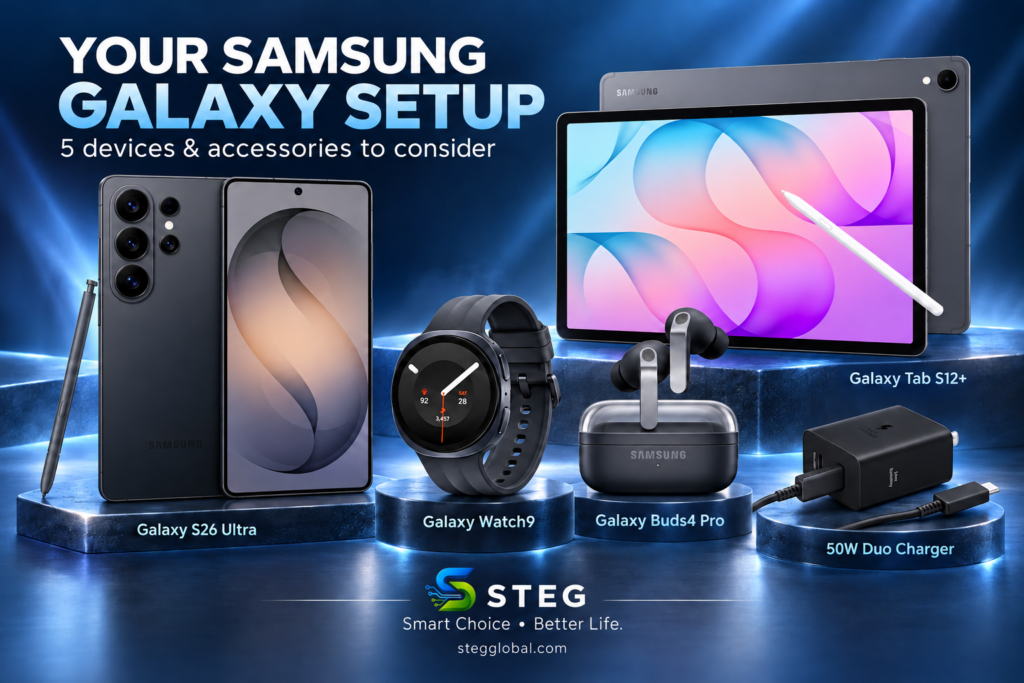
Build Your Samsung Galaxy Setup: 5 Devices and Accessories to Consider
A useful tech setup starts with devices that fit your daily routine. A smartphone handles everyday communication, earbuds make listening more convenient, and a tablet gives you extra room for work and entertainment.
This collection brings together five Samsung devices and accessories to consider. You can start with the item you need most and build your setup gradually.
Affiliate disclosure: This article contains Amazon affiliate links. If you purchase through these links, STEG may earn a commission at no extra cost to you. As an Amazon Associate I earn from qualifying purchases.
1. Samsung Galaxy S26 Ultra: Start with the Phone
The Galaxy S26 Ultra is the main device in this collection. The selected listing is the unlocked 512GB model in Black, with a US one-year warranty.
Its listed features include Privacy Display, Galaxy AI, AI Camera and Super Fast Charging 3.0. The 512GB storage option is worth considering if you keep plenty of photos, videos and apps on your phone.
Who it suits: Someone looking for a premium Galaxy phone with generous storage.
Before buying: Check that the unlocked model supports your carrier. If your current phone already meets your needs, you may get more value from adding an accessory first.
👉 View the Samsung Galaxy S26 Ultra on Amazon
2. Samsung Galaxy Watch9: Add Convenience to Your Wrist
The selected Galaxy Watch9 is the 40mm Bluetooth model in Graphite. Its listing highlights fitness tracking, heart-rate tracking, sleep coaching, running coaching and an AI assistant.
A smartwatch can be useful when you want to check notifications or track activity without reaching for your phone as often. The 40mm option is worth considering if you prefer a smaller watch.
Who it suits: Galaxy phone users interested in everyday activity tracking and convenient access to notifications.
Before buying: This is the Bluetooth version. Do not assume it offers an independent cellular connection. Check wrist sizing, phone requirements and which features are available in your region.
👉 View the Samsung Galaxy Watch9 on Amazon
3. Samsung Galaxy Buds4 Pro: Make Listening More Convenient
The Galaxy Buds4 Pro adds wireless listening to this setup. The selected Black model lists high-resolution audio, a two-way speaker, ANC 2.0 and IP57 protection.
They are an option for listening to music, watching videos and taking calls. The listing also includes Live Translation, although access to advanced features depends on compatible devices, software and supported languages.
Who it suits: Someone who regularly uses earbuds and wants to explore Samsung’s Galaxy audio features.
Before buying: Check compatibility for the features you want. An IP rating does not mean the earbuds and charging case can be exposed to water without restrictions.
👉 View the Samsung Galaxy Buds4 Pro on Amazon
4. Samsung Galaxy Tab S12+: Get More Screen Space
The selected Galaxy Tab S12+ is the 256GB Wi-Fi model in Gray. Its listing includes a 12.6-inch Dynamic AMOLED 2X display, Galaxy AI and IP68 protection.
A tablet gives you more space for reading, viewing documents, taking notes and enjoying entertainment. It can complement your phone if you frequently find a smaller screen limiting.
Who it suits: Someone who wants a larger portable screen for home use, study or everyday work.
Before buying: This is a Wi-Fi model, so mobile internet away from Wi-Fi may require a phone hotspot. Confirm whether the S Pen and any other accessories shown are included. A tablet’s suitability for work also depends on the apps you use.
👉 View the Samsung Galaxy Tab S12+ on Amazon
5. Samsung 50W Duo Power Adapter: Add a Two-Port Charger
The Samsung 50W Duo Power Adapter completes the collection with a practical charging accessory. The selected Black model, EP-T5020XBEGCA, has two USB-C ports and lists a cable as included.
It supports Super Fast Charging 2.0 and can be useful when you want to charge compatible USB-C devices from one wall adapter.
Who it suits: Someone who needs a two-port charger for a phone, tablet or other compatible USB-C device.
Before buying: Charging speed depends on the device, cable and whether both ports are in use. The 50W rating does not mean each port delivers 50W simultaneously. This charger should not be treated as delivering the S26 Ultra’s maximum Super Fast Charging 3.0 speed.
Also check the plug type and warranty coverage for this exact model. A Galaxy Watch still requires its compatible watch charging accessory.
👉 View the Samsung 50W Duo Power Adapter on Amazon
Which Item Should You Add First?
Choose based on the gap in your current setup:
| Your priority | Item to consider |
|---|---|
| Replacing your main phone | Galaxy S26 Ultra |
| Notifications and activity tracking | Galaxy Watch9 |
| Wireless audio and calls | Galaxy Buds4 Pro |
| More space for reading and work | Galaxy Tab S12+ |
| Charging compatible USB-C devices | Samsung 50W Duo Power Adapter |
You do not need all five to enjoy a useful Galaxy setup. Start with the device or accessory that solves an everyday problem, then add others when they serve a clear purpose.
These products are sold separately. This article is a product overview, not a hands-on review. Check each Amazon listing for current specifications, availability, included accessories and warranty terms before purchasing.
STEG — Smart Choice • Better Life.