
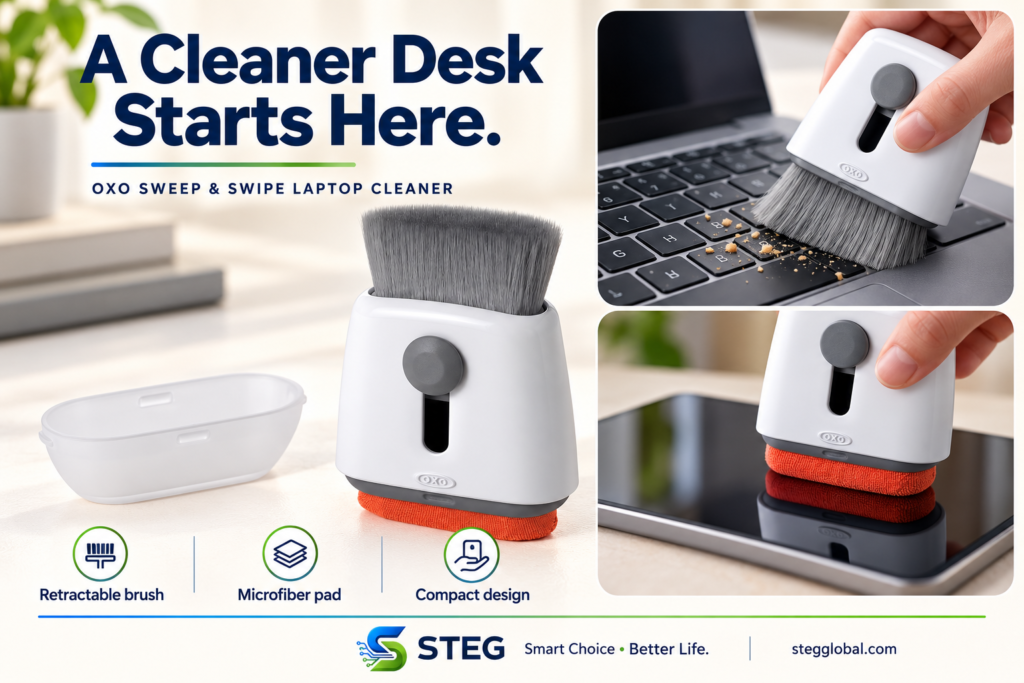
Dust between your laptop keys and fingerprints on a tablet screen can quickly make your workspace look untidy. The OXO Good Grips Sweep & Swipe Laptop Cleaner combines two cleaning tools in one compact design.
With a retractable brush at one end and a microfiber pad at the other, it offers a convenient option for light cleaning. But do you need it if you already own a microfiber cloth?
What is the OXO Sweep & Swipe?
The Sweep & Swipe is a manual cleaning accessory for laptops, phones and tablets. Its brush removes loose dust and crumbs, while its microfiber pad is designed to wipe smudges and fingerprints. A removable cap protects the pad during storage. www.oxouk.com
It requires no batteries, charging or app setup.
Two tools for different tasks
The retractable brush
Use the brush for loose debris around keyboard keys and other accessible surfaces. Gentle strokes can help move dust away without needing to hold a separate brush.
It is intended for surface cleaning. It will not fix sticky keys or remove dirt trapped inside your device.
The microfiber pad
The opposite end provides a small wiping surface for everyday smudges. Its shape lets you work around the corners of a screen.
Before wiping, check that both the pad and screen are free of grit. Follow your device manufacturer’s cleaning instructions, particularly for screens with special coatings.
Who might find it useful?
This cleaner could suit someone who wants a small accessory to keep beside a laptop or carry in a work bag.
It may be particularly convenient if you regularly switch between a laptop and tablet, or prefer keeping a brush and wiping pad together.
However, if a clean microfiber cloth already meets your needs, the main benefit is convenience rather than a completely new cleaning method.
What we like about the design
- Combines brushing and wiping in one tool.
- Retractable bristles make storage neater.
- Includes a protective cap for the microfiber pad.
- Works manually, with no charging required.
Limitations to consider
It is for light cleaning.
Stubborn residue and sticky spills may need a different approach recommended by your device manufacturer.
The cleaning surfaces need maintenance.
A dirty pad can spread grime, and debris caught in it should be removed before use.
It does not disinfect your devices.
Removing visible dust and smudges is different from sanitizing a surface.
A separate cloth may be enough.
Consider whether the combined design adds useful convenience to your routine.
Keeping the cleaner clean
OXO recommends spot-cleaning the microfiber with warm water and mild soap, blotting away excess moisture and allowing it to air-dry. For the bristles, rinse with warm water, remove excess moisture, reshape and leave the brush extended while it dries. www.oxouk.com
These instructions apply to cleaning the tool itself. Let it dry fully before using it on electronics.
Is it worth considering?
The OXO Sweep & Swipe is worth considering if you want a compact brush and microfiber pad together for occasional desk-side cleaning.
Its appeal is straightforward: a small, reusable tool that is easy to keep nearby. Check the current price and decide whether that convenience offers enough value over the cleaning supplies you already have.
Check current price and availability on Amazon
This guide is based on published product information. STEG has not conducted hands-on testing of this product.